Master Output
Final stereo output stage — master volume, mute, FX return levels, and a sum-bus compressor. Master sits in the track ring at position 19, with 19 MASTER in the top-left corner matching the Track 1–16 Sound-page header.
Reach it via the Mixer Select Overlay (hold FUNC4, press Step 5), or the left-arrow chain: from Track 01 a single ← press lands you on Master.
Four pages (navigate with ↑ / ↓):
- OUTPUT — Volume, Mute, Delay return, Reverb return (the controls you always need).
- COMPRESSOR A — threshold / ratio / attack / release.
- COMPRESSOR B — make-up gain / wet mix / side-chain LPF.
- DRIVE — analog-style soft saturation on the master bus.
OUTPUT is the landing page — you’ll spend most of your mix-balancing time here.
The master output is clip-safe by hard guarantee. A soft-clip stage runs at the very end of the chain at all times — no matter what you do with FX sends, Volume, MakeUp, or Drive, peaks above ±1.0 are caught and saturated rather than digitally clipped. This is invisible at default settings (it only catches transient peaks) but means you can push the Drive knob with confidence.
Watch the peak meter in the OLED header — a small horizontal bar between the BPM display and the Stp / Rec / Ply indicator, visible on every page. The bar fills left-to-right with the master peak level. When it goes solid (flashing block) you’re hitting clip threshold (~-0.5 dBFS) and the master soft-clipper is engaging — pull back Volume / MakeUp / Drive, or let the limiter saturate as a creative effect. The flash latches for ~½ second after the last over-peak so brief transients stay visible.
Page 1 — OUTPUT
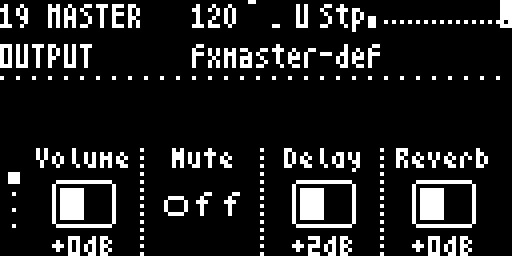
| Knob | Label | Range | What it does |
|---|---|---|---|
| 1 | Volume | dB fader | Master output. Sum of all tracks + FX is multiplied by this stage at the very end of the chain. The fader uses a console-style curve: bottom = silence, mid (default) = 0 dB unity (your bus-sum passes through unchanged), top = +12 dB boost. Defaults boot at unity so the kit doesn’t slam the soft-clip stage right out of the gate. |
| 2 | Mute | off / on | Instantly silences the master output (the P4 writes zeros into the DAC buffer). Press Knob 4 on Global Sound for a fast-access shortcut that doesn’t require leaving the current screen. |
| 3 | Delay | dB fader | Global FX1 return level — how much of the delay bus ends up in the main mix. Mirrors Global Sound’s Delay knob. |
| 4 | Reverb | dB fader | Global FX2 return level — how much reverb ends up in the main mix. Mirrors Global Sound’s Reverb knob. |
All four live-performance master controls are on this single page. For a live set, you never need to leave it.
Page 2 — COMPRESSOR A
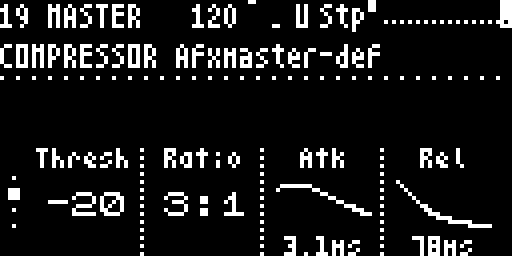
The sum-bus compressor’s core dynamics controls. The compressor sees the dry mix only (FX returns skip its side-chain so reverb/delay tails don’t duck); users who want a pumping-reverb effect can side-chain via p-locks on the source tracks instead.
| Knob | Label | Range | What it does |
|---|---|---|---|
| 1 | Thresh | −80 .. 0 dB | Level above which the compressor starts reducing gain. |
| 2 | Ratio | 1:1 .. ∞:1 | Compression ratio. At 3:1, every 3 dB over threshold becomes 1 dB of output. |
| 3 | Atk | 0.3 .. 30 ms | How fast the compressor reacts to peaks. Rendered as an attack-envelope curve. |
| 4 | Rel | 40 .. 2000 ms | How fast the compressor lets go. Rendered as a release-envelope curve. |
Page 3 — COMPRESSOR B
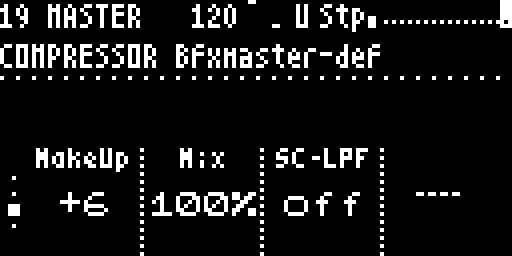
Output stage, wet/dry balance, and a side-chain filter. Typically set once per song and left alone.
| Knob | Label | Range | What it does |
|---|---|---|---|
| 1 | MakeUp | 0 .. +60 dB | Make-up gain after compression. Dial in to match the pre-compression loudness. |
| 2 | Mix | 0 .. 100 % | Parallel-compression wet/dry blend. 100 % = fully compressed (typical bus-compressor setting). 50 % = “New York” parallel-compression mix. |
| 3 | SC-LPF | off / on | Side-chain low-pass. When on, the compressor only “hears” the bass content of the mix — less pumping on cymbals and transients. |
| 4 | — | — | Reserved for the gain-reduction meter (future firmware, Phase 11). |
Page 4 — DRIVE
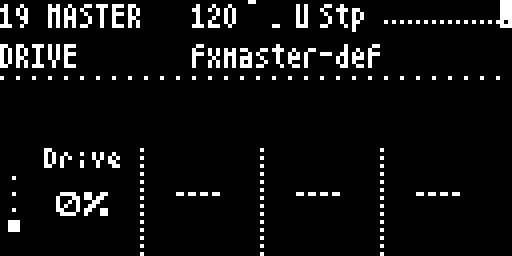
Analog-style soft-saturation at the very end of the chain. Adds warm bus character that’s hard to get from compression alone.
| Knob | Label | Range | What it does |
|---|---|---|---|
| 1 | Drive | 0 – 100 % | 0 % = transparent (1× — bit-identical to no-drive). 50 % ≈ 2× drive — gentle warmth, perceptible saturation only on peaks. 100 % = 4× — heavy character, saturation throughout. Auto makeup gain (1/√drive) partially compensates for the loudness bump so you can dial in colour without re-balancing the mix. |
Try Drive 35–50 % as a “always-on glue” setting on busy mixes — it’s the same trick as putting a console saturation plugin on the master bus. Heavier settings work for distorted lo-fi or dub aesthetics.
Navigation
| Action | Result |
|---|---|
← | Go to FX2 |
→ | Go to Track 1 Sound screen |
↑ / ↓ | Switch pages (OUTPUT → COMP A → COMP B → DRIVE) |
See also
- Global Sound — the four-knob shortcut page (Input / Delay / Reverb / Master) with a knob-press for instant mute.
- FX — what the Delay and Reverb buses actually do.
- Signal flow — where the master stage sits in the chain.