Hardware
Physical layout, connections, controls, and specifications of the tbd 16.
At a glance
The tbd 16 is a compact desktop instrument. All controls sit on the top, all audio and sync jacks on the right side, power and computer connections on the left side, and the SD card slot on the bottom.
| Where to find it | Section |
|---|---|
| All connections (audio, MIDI, USB, SD, power) | Connections |
| Every button shortcut in one place | Button Reference |
| Measured audio performance & hardware specs | Technical Specifications |
Top — controls
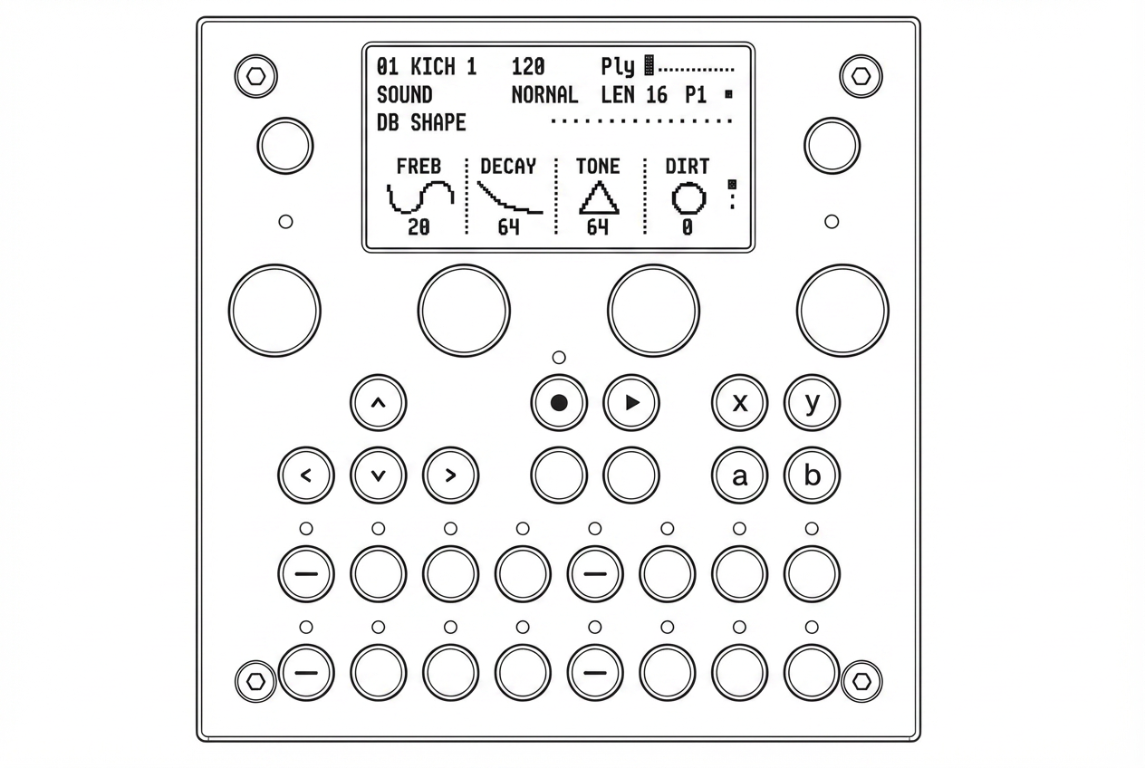
| Area | Controls |
|---|---|
| Upper left / right | FUNC1 (Project) and FUNC2 (Global) with status LEDs |
| Below the display | 4 rotary push-encoders (KNOB 1–4) |
| Center left | D-Pad (↑ ↓ ← →) |
| Center | REC, PLAY, SHIFT, HYPER |
| Center right | FUNC3–FUNC6 (Sound, Pattern, A, B) |
| Bottom rows | 16 RGB-backlit step buttons |
A 2.4″ OLED display sits in the upper centre. A dedicated volume wheel sits on the right side of the top panel.
Right side — audio and MIDI
(placeholder image — right side of the device)
- Stereo line in (TRS 3.5 mm)
- Stereo line out (TRS 3.5 mm)
- Headphone out (TRS 3.5 mm)
- TRS MIDI 1 In / Out
- TRS MIDI 2 In / Out (TRS MIDI 2 In doubles as Eurorack Clock/Reset input)
Left side — power and computer
(placeholder image — left side of the device)
- USB-C — power and connection to a computer (MIDI, web interface over USB network)
- USB-A — host port for class-compliant USB MIDI controllers (Launchpad, Launchkey, etc.)
- Secondary USB-C ports for additional power / development use
Bottom — SD card and MIDI/Clock switch
(placeholder image — bottom of the device)
- SD card slot — all project data, presets, and samples are stored here
- MIDI 2 / Clock switch — toggles TRS MIDI 2 In between standard MIDI and analog Clock/Reset for Eurorack sync
LEDs
The tbd 16 has 21 RGB LEDs that provide visual feedback:
| LEDs | Position | Purpose |
|---|---|---|
| 1–16 | Under the step buttons | Step state, playback position, track activity |
| 17–18 | Above FUNC1 / FUNC2 | Configurable status indicators |
| 19–21 | Internal | System status |
Brightness and colour theme can be adjusted in Settings → Display.