Global Sound
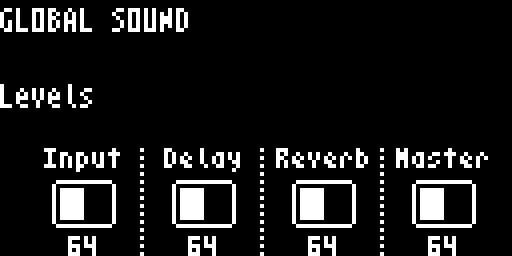
The Global Sound screen provides quick access to four key system levels. Access it with FUNC2.
Navigation
Parameters
| Knob | Label | Description |
|---|---|---|
| Knob 1 | Input | Input level (routed through Track 16 mixer) |
| Knob 2 | Delay | FX1 (Delay) return level |
| Knob 3 | Reverb | FX2 (Reverb) return level |
| Knob 4 | Master | Master output level (boot default = unity) |
All four parameters use the squared fader curve — wire 0 reads off (silence), wire 64 reads 0dB (unity gain), wire 127 reads +12dB (maximum boost). The same curve is used by per-track LEVEL on the Track Mixer and Mixer pages, and by Master Volume on the Master page — so 0dB means the same thing everywhere on the device.
Master Volume defaults to unity (wire 64) at boot so a fresh kit doesn’t slam the master soft-clip stage.
Master Mute
Press Knob 4 to toggle the master mute. When muted, the master output is silenced.
Watching for clip
The OLED header peak bar (between BPM and the Stp / Rec / Ply indicator) and the multi-zone FUNC1 / FUNC2 LEDs on the front panel both show the post-soft-clip output level. See Master Output for the colour-zone reference and Signal Flow for where the always-on output soft-clip sits in the chain.