Effects (FX)
The tbd 16 has two global FX buses: FX1 (delay) and FX2 (reverb). Every track feeds into both via its per-track TR.MIX FX1 and FX2 send knobs. FX1 / FX2 sit in the track ring as Track 17 and Track 18 — they share the same track-header layout as Sound pages 1–16, with 17 FX1 or 18 FX2 in the top-left corner.
Reach them via the Mixer Select Overlay (hold FUNC4, press Step 6), or use the left-arrow chain: from Track 01 press ← once to reach 19 MASTER, twice more to reach FX2 and FX1.
The FX return levels (how much of each bus ends up in the main mix) live on the Master Output screen alongside Volume and Mute, not on the FX screens themselves. The FX screens below are for shaping the effect, not scaling it.
FX1 — Delay
Tempo-synced stereo delay with 12 musical subdivisions, recirculating feedback, tape/digital character modes, a band-pass tone-shaper on the feedback path, and a cross-send into the reverb. Two pages.
Page 1 — DELAY
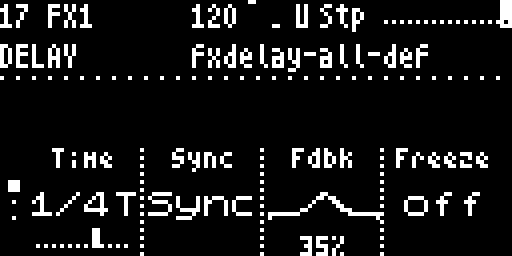
The live-performance page — everything you’d reach for during a set.
| Knob | Label | Range | What it does |
|---|---|---|---|
| 1 | Time | 12 musical divisors (Sync=on) or 0 – 2000 ms (Sync=off) | Delay time. When Sync is ON, the knob snaps through 1/32 · 1/16T · 1/16 · 1/16D · 1/8T · 1/8 · 1/8D · 1/4T · 1/4 · 1/4D · 1/2 · 1/1, recomputed every audio block from the live tempo so BPM drags track sample-accurately. When Sync is OFF, the knob is linear ms 0..2 s. A small 12-tick scale under the big 1/16T label shows position. |
| 2 | Sync | Free / Sync | Mode switch for the Time knob. Sync = tempo-locked divisors (recommended default). Free = raw ms, sequencer-independent. |
| 3 | Fdbk | 0 – 100 % | Feedback: how much of the delay tail re-enters the delay line. Around 80 % the loop approaches self-oscillation; a soft-limiter catches divergence so nothing clips catastrophically. |
| 4 | Freeze | off / on | Stops the delay from writing new input — the existing buffer loops forever. Useful for granular-style locked pads and performance drops. |
Page 2 — DELAY TONE
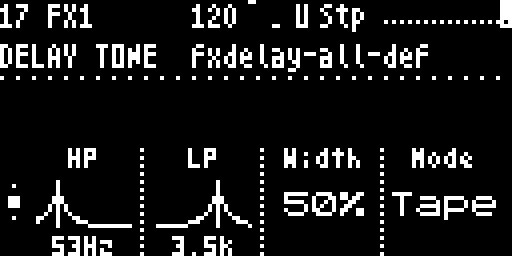
Feedback-path tone shaping + routing. Typically set per preset, rarely touched during a performance.
| Knob | Label | Range | What it does |
|---|---|---|---|
| 1 | HP | ~20 Hz .. 20 kHz | High-pass corner on the feedback path. Rolls off DC, rumble and low-end mud from sustained delay tails. |
| 2 | LP | ~20 Hz .. 20 kHz | Low-pass corner on the feedback path. Below HP the feedback goes dark quickly (classic dub-echo character). |
| 3 | Width | 0 – 100 % | Stereo spread of the delay taps — 0 % collapses the L/R repeats to mono, 100 % gives full ping-pong-style separation. The lift curve is concave: small knob moves stay near mono, full stereo concentrates in the upper half of travel. |
| 4 | Mode | Tape / Dgtl | Character toggle. Tape slews the delay-time offset when Time changes and ducks the output briefly to mask clicks — the classic tape-echo pitch-warp effect. Dgtl snaps instantly to the new time. |
Reach for DELAY first during a performance (Time, Sync, Fdbk, Freeze) and DELAY TONE only when setting up the patch (filter shape, stereo width, character mode).
Page 3 — DELAY ROUTE
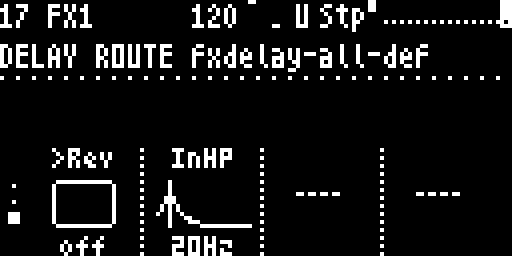
Cross-routing + input filtering. Tier-3 — touched once per song to set up sends and input shaping.
| Knob | Label | Range | What it does |
|---|---|---|---|
| 1 | >Rev | 0 – 100 % send | Delay → Reverb cross-send. Pipes the delay output into the reverb input so delay tails get reverb-washed. Classic “big ambient” trick. |
| 2 | InHP | ~20 Hz .. 2 kHz | Delay-input high-pass — cuts low frequencies from the dry signal entering the delay (independent from the feedback-path HP on DELAY TONE). Pro pattern: HP both ends of the loop so bass-heavy material doesn’t muddy the repeats. Default 20 Hz = effectively off. |
FX2 — Reverb
Dattorro / Griesinger-topology reverb (4 input all-pass diffusers feeding a loop of 2 × (2AP + 1Delay)). Two pages — REVERB for tone shaping, REVERB MOD for the modulation rate.
Page 1 — REVERB
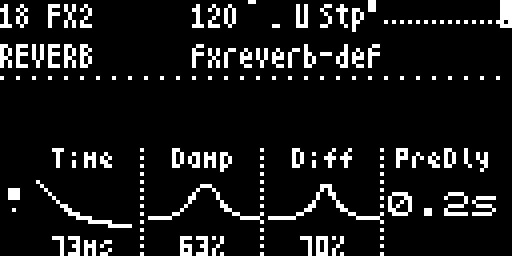
| Knob | Label | Range | What it does |
|---|---|---|---|
| 1 | Time | 0..10 s (approx) | Reverb-tank decay time. Short at wire 0 (ambient / slap), long at wire 127 (cathedral). |
| 2 | Damp | 0 – 100 % | In-loop low-pass damping. 0 = bright shimmery tail, 100 = dark room. Equivalent to a high-frequency absorption coefficient on the walls. |
| 3 | Diff | 0 – 100 % | Diffusion — how much the input gets smeared by the all-pass stages. Low values = discrete echo-like taps (“slap echo”). High values = smooth diffuse wash (“cathedral”). Default ~70 % matches the classic mifx reverb character. |
| 4 | PreDly | 0 – 200 ms | Pre-delay before the reverb tank — how long the dry hit plays before the tail starts. Adds room-size realism; large halls have perceptible pre-delay (the time sound takes to travel from source to wall and back). |
Page 2 — REVERB MOD
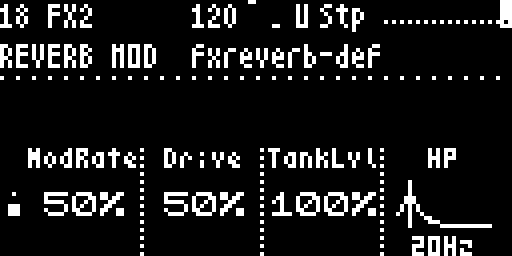
Reverb-tank internals. All three knobs target the engine itself rather than the dry/wet send.
| Knob | Label | Range | What it does |
|---|---|---|---|
| 1 | ModRate | 0 – 100 % | Internal modulation rate — scales the two LFOs that detune the reverb tank’s all-pass delays. Wire 0 freezes the LFOs (clean classical reverb, no chorus). 50 % is the default 1× speed (0.5 / 0.3 Hz). 100 % doubles the rate, pushing the tail into chorus / shimmer territory. |
| 2 | Drive | 0 – 100 % | Reverb input gain. 50 % is the legacy 0.5× — gentle. 100 % pushes signal into the input diffusers harder for a denser, more saturated tail (good with percussive material). 0 % silences the reverb input entirely. |
| 3 | TankLvl | 0 – 100 % | Internal tank gain. 100 % is the legacy 1.0× full level. Lower values bring the wet signal down inside the tank itself — useful when stacking reverb with delay so the tank doesn’t dominate. Different from the Master OUTPUT Reverb knob, which controls how much reverb returns to the main bus. |
| 4 | HP | ~20 Hz .. 2 kHz | High-pass shelf on the reverb input, applied before the tank. Pairs with Damp (low-pass): together you get a band-pass on what enters the reverb, cleaning up the tail. Default 20 Hz = bypassed; raise to thin out kick/bass mud in busy mixes. |
For a “shoegaze big-tail” sound: high Time, low Damp, high Diff, mid PreDly, ~75 % ModRate, push Drive to 75 %, leave TankLvl at 100 %, raise HP slightly to keep the tail clean, and bring up Master OUTPUT Reverb to taste.
The reverb return level (how much wet signal ends up in the main mix) is on Master Output as the Reverb knob, not here. Use per-track TR.MIX FX2 sends to decide what goes to the reverb, and Master OUTPUT Reverb to decide how much comes back.
Navigation
The FX screens live in the track ring at positions 17 (FX1) and 18 (FX2):
| Action | Result |
|---|---|
← at Track 01 | Go to Master (19), then ← again → FX2 (18), ← again → FX1 (17) |
→ at FX1 | Go to FX2 |
← at FX1 | Go to Track 16 Sound screen |
→ at FX2 | Go to Master |
← at FX2 | Go to FX1 |
↑ / ↓ | Switch between pages within FX1 (DELAY / DELAY TONE / DELAY ROUTE) or FX2 (REVERB / REVERB MOD) |
The gutter dots on the left edge of the OLED indicate which page you’re on within an FX group.
FX Sends
Each track sends to FX1 / FX2 via its per-track TR.MIX page (Track Mixer). FX sends are post-fader, post-pan, so pulling LEVEL to silence also cuts the FX tail. If you want an FX tail to ring after the track mutes, p-lock the send level instead of the channel level.
The global FX return amounts live on the Master Output and Global Sound screens.